
Register With My Bank (RWMB) uses our FCA licensed Open Banking connections to extract name, address and Date of Birth directly from your customer’s personal bank account for use in age and ID verification flows. The customer does not need to fill in any forms in order to onboard with you and the process takes just seconds.
For additional confidence, we can cross-verify the data from the bank account with credit file and authoritative public source data sets to provide full 2+2 verification instantly.
Application Flow
RWMB is designed to fit into your existing onboarding flow at any point you want to use it.
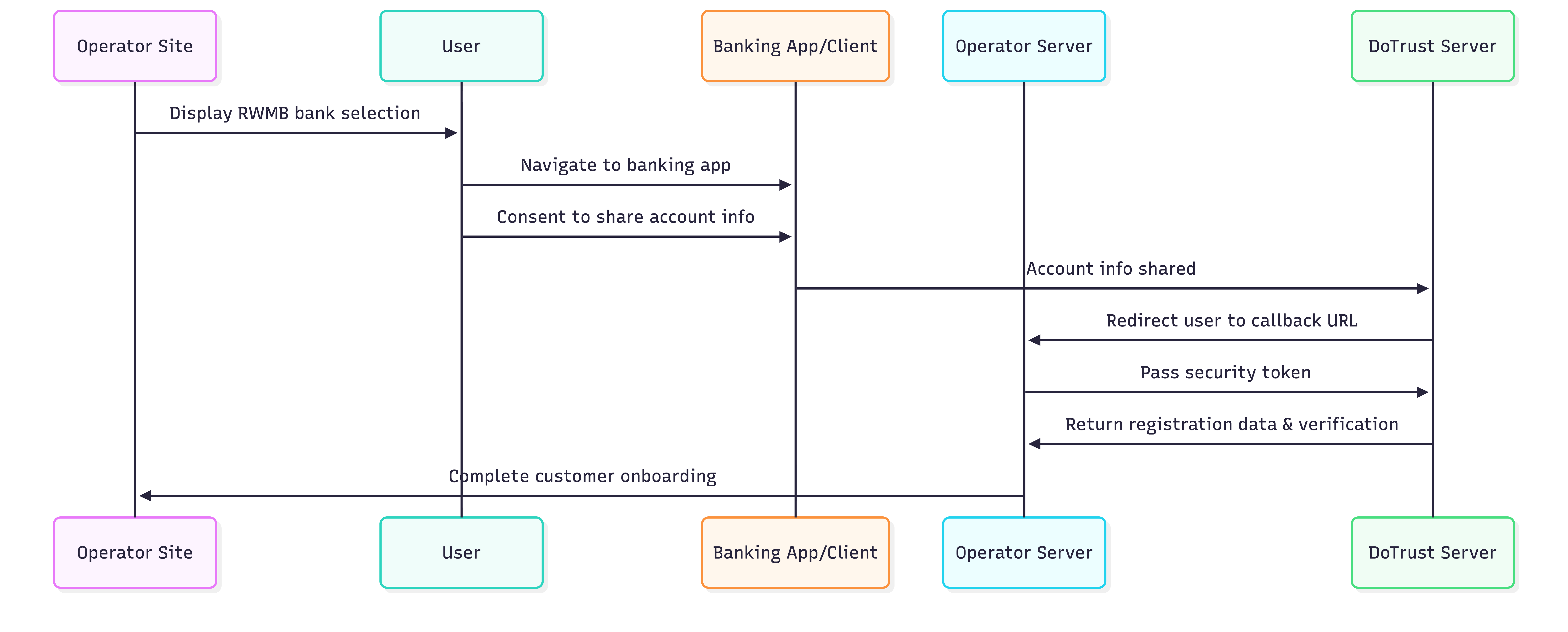
Deploy the RWMB Javascript in your site where you want to offer RWMB. You can invoke the feature by calling the
The customer is presented with the bank list rendered in an iFrame on your site where you have deployed it.
The customer can access their bank on the same device or jump to mobile by scanning a QR code.
After logging in to their bank and confirming the sharing request, they are redirected to your callback URL with relevant parameters.
On receiving the callback URL, you can retrieve the collected data from our endpoint using the short-lived token we provide with the callback.
You can then continue your onboarding flow with the customer.
Deploying the journey in your website
Deployment involves:
Adding a JS script tag with a journey-specific URL to the page
Adding a DIV tag to the page with dynamic parameters relevant to your deployment methodology:
session token: optionally, pass this to use to track the onboarding session your side. It will be returned with the callback URL.
customer id: optionally, provide the customer ID which you will assign to this user. This is not required but can help you find the customer in our platform after.
You can also set the mode (‘inline’ - renders in place, ‘button’ - renders a button, ‘hidden’ - doesn’t render but exposes a function you can invoke in JS from your own UI prompt to open the journey in a modal)
If embedding the bank flow inline, you can also provide height and width.
Callback handling
You will need to set up an endpoint on your server to receive the callback after the user has completed the journey.
The callback is a redirect of the client device, so will have the same user agent as the device which initiated the journey.
A callback looks like:
shell
https://thunderbets.co.uk/register-callback?
status=success
&responseToken={TOKEN_VALUE}
&referenceId={STRING_VALUE}
status
success - data retrieved from bank; this does not mean additional verification was succesful (if requested)
failed - data not retrieved from bank. The journey could fail for a number of reasons:
Customer failed / refused
Technical issue with bank
Customer did not connect a verifiable account
responseToken
This is the short-lived token used to retrieve the customer data. See below
referenceId (optional)
This is the session string / correlation token you incorporated into the RWMB initial request on your website, for your own session management of the onboarding process. It is optional.
Retrieving the customer data
We provide a simple endpoint to securely retrieve the customer’s registration data after the callback. POST to this endpoint from your server:
plaintext
https://complete.dotrust.co/register_with_my_bank/retrieve_dataWith this JSON body:
json
{
   responseToken: <value from callback>,
   sharedSecret: <value from console>
}
The token must be posted with the sharedSecret from your server to ensure security.
If the responseToken + sharedSecret are valid, the response will look like this:
plaintext
{
    given_name: string,
    surname: string,
    dob: 'DD-MM-YYY',
    house_name_number: string,
    street: string,
    city_town: string,
    postcode: string,
    country: 'GB',
    matched_sources: [string, string],
}“matched_sources” is included only if you have asked us to verify the registration data from the bank against other sources for a 2+2 check.
The additional sources matched can be:
Electoral Roll: the current or rolling register;
Active Credit Agreements: the customer has one or more loans or bank accounts in their legal name at the registered address within the last month.
Registered deceased: a person matching your customer is on the HALO register.
Court records: there has been one or more County Court Judgement, IVA or bankruptcy in your customers name, at this address and with this DOB in the last 12 months.
Credit searches: an authorised lender has searched this persons credit file with these details in the last 6 months following a credit application.
Refer: This happens when there is insufficient confidence from the CRA sources in the address itself. This could be because the bank holds a different address (e.g. very recently moved), or the address itself has an error. These cases typically require further investigation; it does not automatically mean that the identity is false. The matching algorithm for this additional verification is strict: it is confirming evidence of current presence at the address, typically for AML purposes, using the legal name. If the person has recently moved and changed their name, it is possible that additional verification might return fewer or no results. We provide additional services within the platform for performing incremental assurance on presence and identity.
Sandbox mode for integration testing
You can put your journey into Sandbox mode in the console.
Sandbox mode is designed to help you test your implementation before go-live with fake data.
You don’t need to make any changes to the client or your server functions to use this tool.
When your journey is in sandbox:
Only one bank, Mockbank, is available
When you click Mockbank you are offered a range of callback scenarios for your testing
The callback will have a responseToken which you can use along with your sharedSecret to retrieve the sandbox customer data
Once you’ve tested all your paths, simply disable sandbox mode in the console and you are good to go